Maximizing Printer Productivity and Expressive Capabilities
Software RIP “RasterLink8” Now Available
Mimaki Engineering Co., Ltd. (Headquarters: Tomi City, Nagano Prefecture; President and CEO: Kazuaki Ikeda) will begin offering “RasterLink8,” a software RIP*1 compatible with the company’s inkjet printers, starting in October.
*1. Raster Image Processor: Software that processes design data into images compatible with the printer
To date, our company has consistently developed and provided our customers with the technologies that make up the printing process—from ink and printers to the software that controls them.
Even high-productivity printers can only contribute to our customers’ business results when their full potential is properly utilized. Similarly, ink with a rich color gamut can only achieve the intended results when its characteristics are properly expressed.
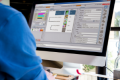
“RasterLink8,” which we are now introducing, maximizes the productivity and expressive capabilities of Mimaki printers and inks, while also supporting on-site workflow efficiency and color management. It is software designed to help customers utilize their printers’ capabilities more seamlessly.
Key New Features in RasterLink8
Fig 1. Apparel Designs Featuring Rich Shades of Violet

Fig 2. Fluorescent Color Collection and Instructions for Use
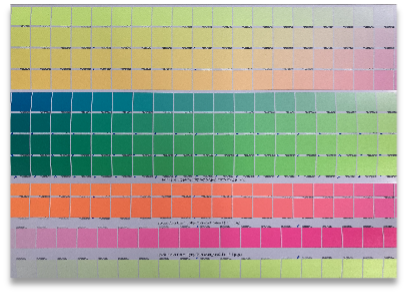 Print the color chart in advance |  Enter the spot color names from the color chart into the design data |
2. Enables color matching across different printers. The built-in emulation feature helps expand business opportunities.
*2. A colorimeter and peripheral devices (sold separately) are required.
Fig 3. Large Order for Signs (Left)
Examples of Brand Promotional Items (Right)

3. Substrate Position Detection via Camera and Automatic Print Image Placement
RasterLink8 is a tool designed to help customers fully utilize the capabilities of their printers and inks in their print environments, enabling them to achieve both the productivity of “fast, stable production” and the expressive power of “richer, more faithful reproduction.”
Additionally, with features that allow you to check jobs currently running on the printer and their progress, you can efficiently manage on-site operations while keeping track of multiple print jobs.
Furthermore, by automatically backing up your valuable print data to the cloud, we provide an environment where you can tackle your daily printing tasks with peace of mind, protected against the risk of data loss.
We turn your “I want to create” into “I can create”—more efficiently, more reliably, and with peace of mind. RasterLink8 supports your print business operations.
At Mimaki Engineering, we are constantly striving for new technological innovation. Using our proprietary technologies, we beautifully bring your ideas to life and, by streamlining production processes, support the creation of higher-value-added products and the development of new business opportunities.
About Mimaki Engineering Co., Ltd. Mimaki Engineering develops, manufactures, markets and maintains industrial inkjet printers, cutting plotters, 3D printer inks, and related software. By providing total printing process solutions for sign graphics, industrial products and textile apparel markets, we intend to become innovators capable of consistently delivering “Something New, Something Different” to our customers.
Company/IR website: https://ir-eng.mimaki.com/
Product website: https://mimaki.com/
Listing information:
Mimaki USA
4851 Thurmon Tanner Parkway, Suite 100
Flowery Branch, GA 30542
Toll-free: 888-530-4021
Inquiries from general customers: Email: usa.info@mimaki.com
Web (English): https://www.mimakiusa.com/
Web (Español): https://es.mimakilatam.com/